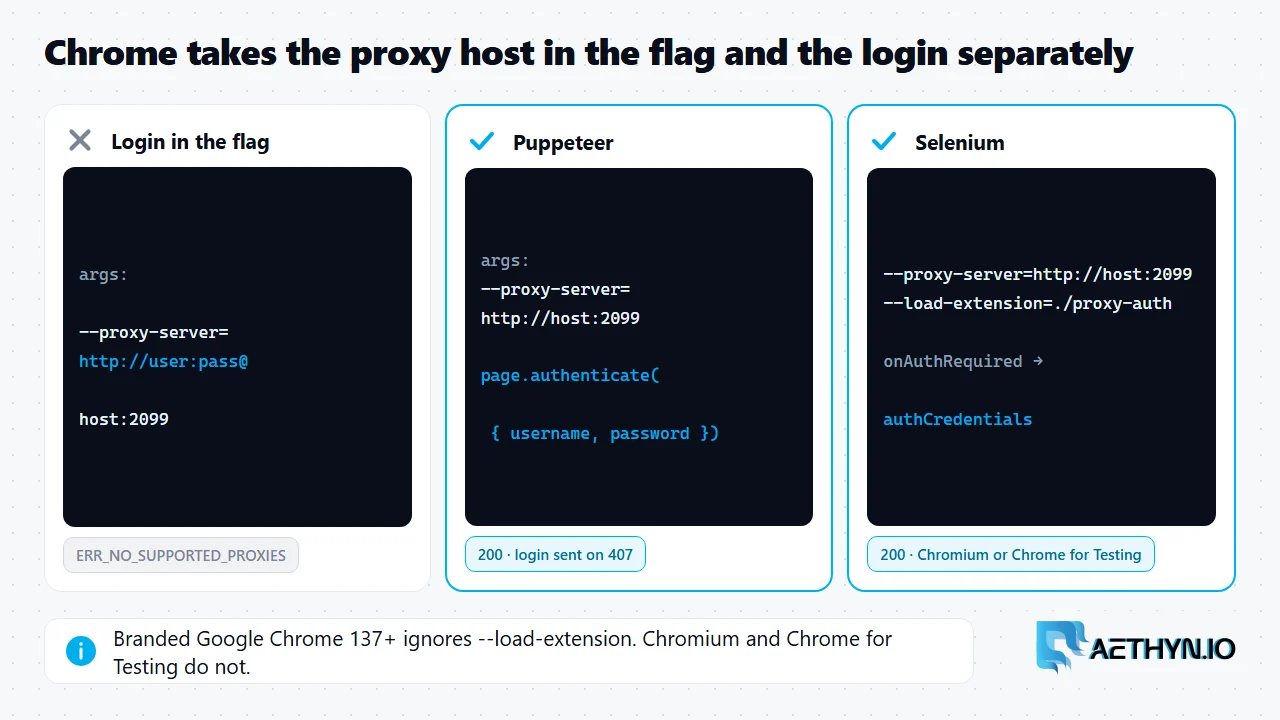
Short answer: Chrome does not accept a username and password inside its --proxy-server flag. Writing --proxy-server=http://user:pass@host:port fails with net::ERR_NO_SUPPORTED_PROXIES, and the proxy never even sees a request. We confirmed this with Chromium 149 in both Puppeteer and Selenium. The fix is to pass only the host and port in --proxy-server and supply the credentials separately, when the proxy asks for them with a 407 challenge. In Puppeteer that is one call, page.authenticate(). Selenium has no equivalent built into its Chrome options, and in our test its BiDi authentication handler did not answer proxy challenges, so the reliable route is a small Manifest V3 extension that answers them. Playwright avoids the problem entirely, because its proxy option takes the username and password as separate fields. Each approach below was run against a local test proxy that checks the login.
Why the URL form fails
Command-line proxy settings in Chrome take a list of proxy servers, and a server entry carries a scheme, a host and a port. It does not carry a login. When Chrome is given credentials in that value, it cannot use the proxy at all, so it reports that no supported proxy is configured, ERR_NO_SUPPORTED_PROXIES, rather than sending the login. That is also why the error appears instantly instead of after a network attempt: in our test the proxy logged no request from either browser. Authentication happens one step later. Chrome connects to the proxy without credentials, the proxy replies 407 Proxy Authentication Required, and the browser has to answer that challenge. In an interactive browser a login dialog does it. Automation tools have to answer it in code, which is what each fix below does. The same 407 shows up in other clients as proxy error 407.
Puppeteer: page.authenticate()
Code Snippetconst puppeteer = require("puppeteer");

(async () => {
  const browser = await puppeteer.launch({
    // Host and port only. A login inside --proxy-server fails with
    // net::ERR_NO_SUPPORTED_PROXIES.
    args: ["--proxy-server=http://proxy.aethyn.io:2099"],
  });
  const page = await browser.newPage();
  // Answers the proxy's 407 challenge for every request on this page.
  await page.authenticate({
    username: "aethyn-XXXXX-country-us",
    password: "PASSWORD",
  });
  const res = await page.goto("https://httpbin.org/ip");
  console.log(res.status(), await page.$eval("body", (el) => el.innerText));
  await browser.close();
})();
page.authenticate() applies to the page you call it on, so call it on every new page before navigating. Puppeteer turns on request interception behind the scenes to do this, and its documentation notes that this can affect performance.
Selenium: a two-file extension
Code Snippetimport json
import pathlib
import tempfile

from selenium import webdriver
from selenium.webdriver.chrome.options import Options


def proxy_auth_extension(username: str, password: str) -> str:
    """Write a two-file MV3 extension that answers the proxy's 407 challenge."""
    folder = pathlib.Path(tempfile.mkdtemp(prefix="proxy-auth-"))
    (folder / "manifest.json").write_text(json.dumps({
        "manifest_version": 3,
        "name": "Proxy auth",
        "version": "1.0",
        "permissions": ["webRequest", "webRequestAuthProvider"],
        "host_permissions": ["<all_urls>"],
        "background": {"service_worker": "background.js"},
    }))
    (folder / "background.js").write_text(f"""
chrome.webRequest.onAuthRequired.addListener(
  (details, callback) => {{
    if (!details.isProxy) return callback({{}});
    callback({{ authCredentials: {{ username: {json.dumps(username)}, password: {json.dumps(password)} }} }});
  }},
  {{ urls: ["<all_urls>"] }},
  ["asyncBlocking"]
);
""")
    return str(folder)


options = Options()
# --load-extension works in Chromium and Chrome for Testing, not in branded
# Google Chrome 137+. Point binary_location at one of those if needed.
options.add_argument("--proxy-server=http://proxy.aethyn.io:2099")  # no login here
options.add_argument("--load-extension=" + proxy_auth_extension("aethyn-XXXXX-country-us", "PASSWORD"))

driver = webdriver.Chrome(options=options)
try:
    driver.get("https://httpbin.org/ip")
    print(driver.find_element("tag name", "body").text)
finally:
    driver.quit()
The code on this page was run on November 22, 2026 against a local stand-in proxy that checks the login (Chromium 149, requests 2.34, Selenium 4.53, Puppeteer 25.18), not against live targets or the Aethyn gateway. Replace aethyn-XXXXX and PASSWORD with your own credentials.
The extension answers only proxy challenges (details.isProxy), so site logins are left alone. Since Chrome 137, branded Google Chrome ignores --load-extension. Chromium and Chrome for Testing still honour it, which is why the comment points binary_location at one of them.
Which tool to choose
| Tool | How credentials are passed | Tested result |
|---|---|---|
Chrome --proxy-server=http://user:pass@… | Inside the URL | ERR_NO_SUPPORTED_PROXIES |
| Puppeteer | page.authenticate() | Works |
| Selenium + MV3 extension | onAuthRequired handler | Works in Chromium and Chrome for Testing |
| Selenium BiDi auth handler | network.add_auth_handler | Timed out with Selenium 4.53 |
| Playwright | proxy.username / proxy.password | Works; see Playwright with residential proxies |
For SOCKS5, none of these help: Chromium cannot authenticate to SOCKS5 proxies, so use the HTTP port. Other Chrome proxy failures are covered in ERR_PROXY_CONNECTION_FAILED and ERR_TUNNEL_CONNECTION_FAILED.
Browser proxy authentication questions
Why does user:pass in --proxy-server not work in Chrome?
How do I authenticate a proxy in Puppeteer?
How do I authenticate a proxy in Selenium with Chrome?
Does Selenium's BiDi authentication handler work for proxies?
Guides, integrations & docs
Continue reading
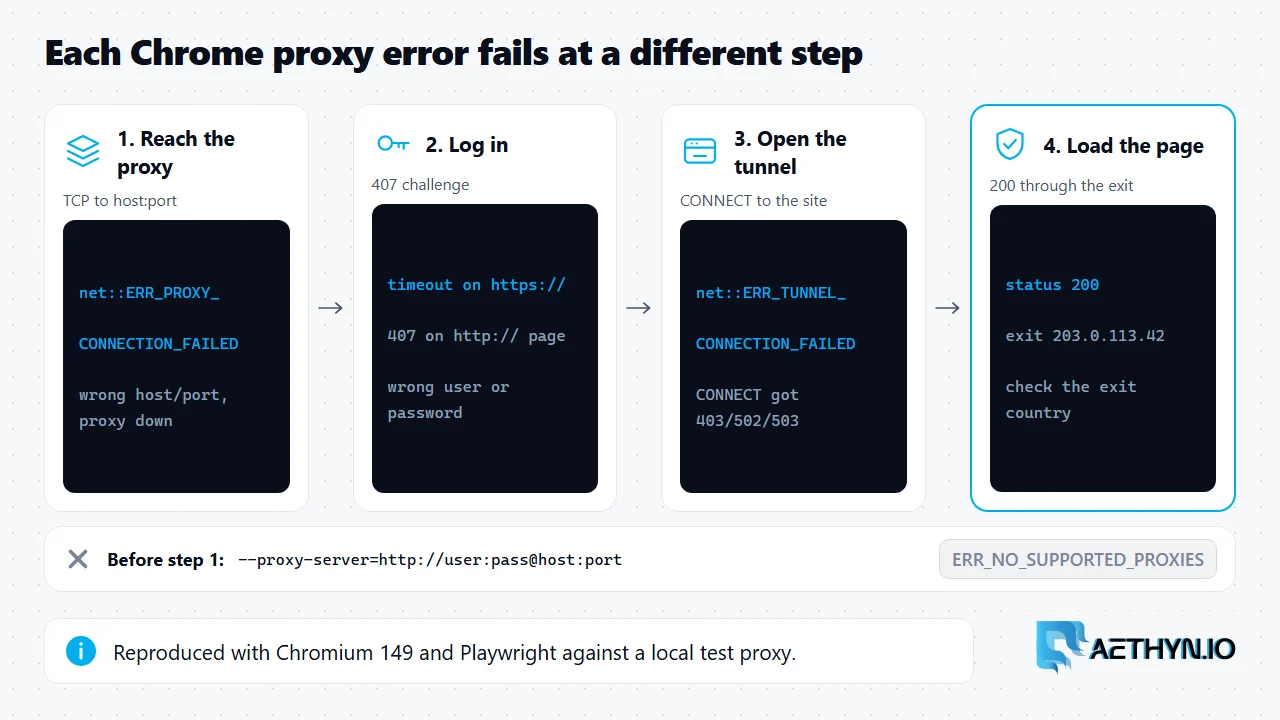
Chrome Proxy Errors: Connection Failed vs Tunnel Failed, and How to Fix Each
Chrome's two proxy errors fail at different steps. ERR_PROXY_CONNECTION_FAILED means the browser never reached the proxy; ERR_TUNNEL_CONNECTION_FAILED means the proxy refused the tunnel. Reproduced with Playwright.
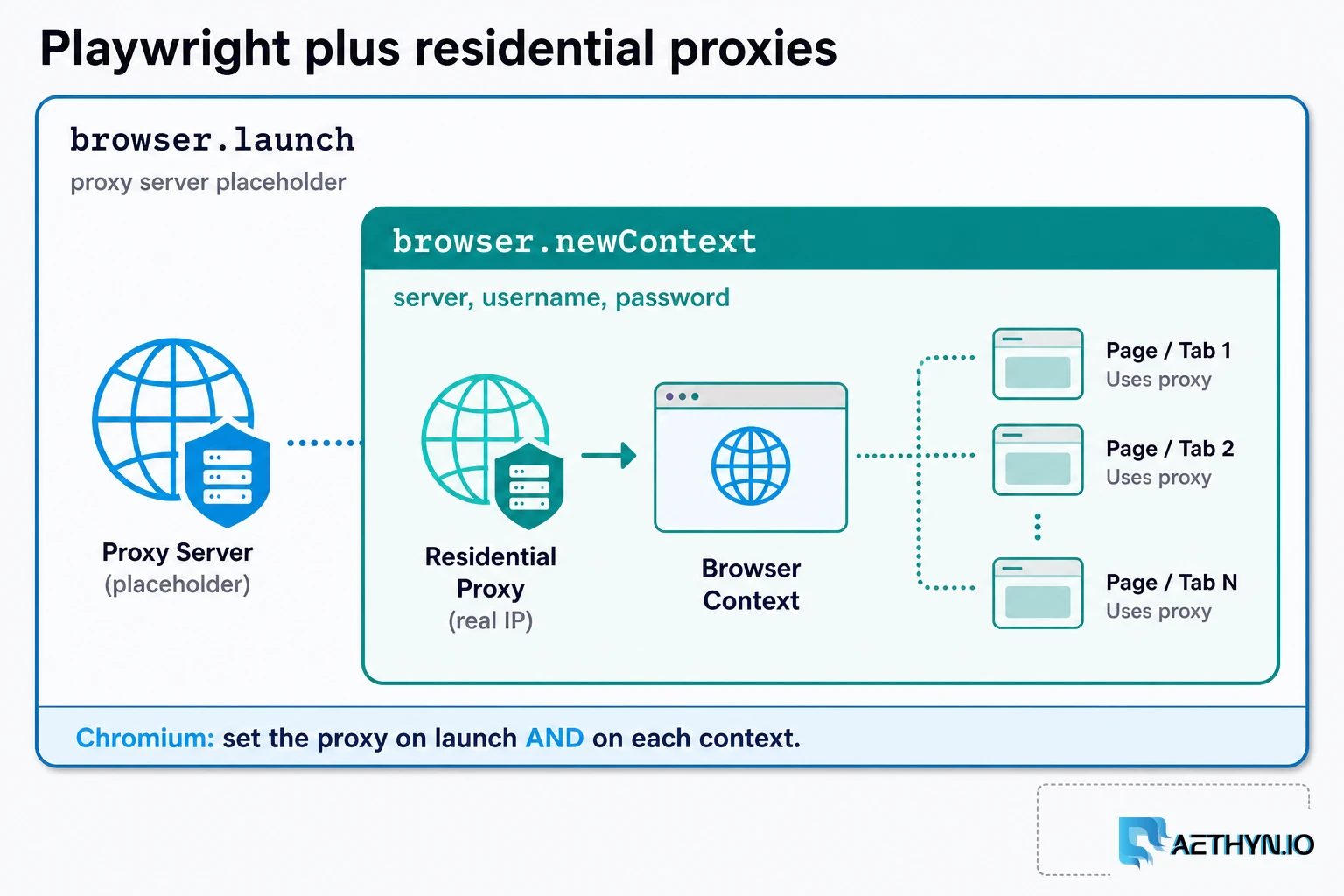
How to Use Residential Proxies with Playwright (2026)
A Playwright residential proxy is a browser context whose traffic exits through an ISP-assigned household IP. Credentials go in fields, rotation is a new context, and locale must match the exit.
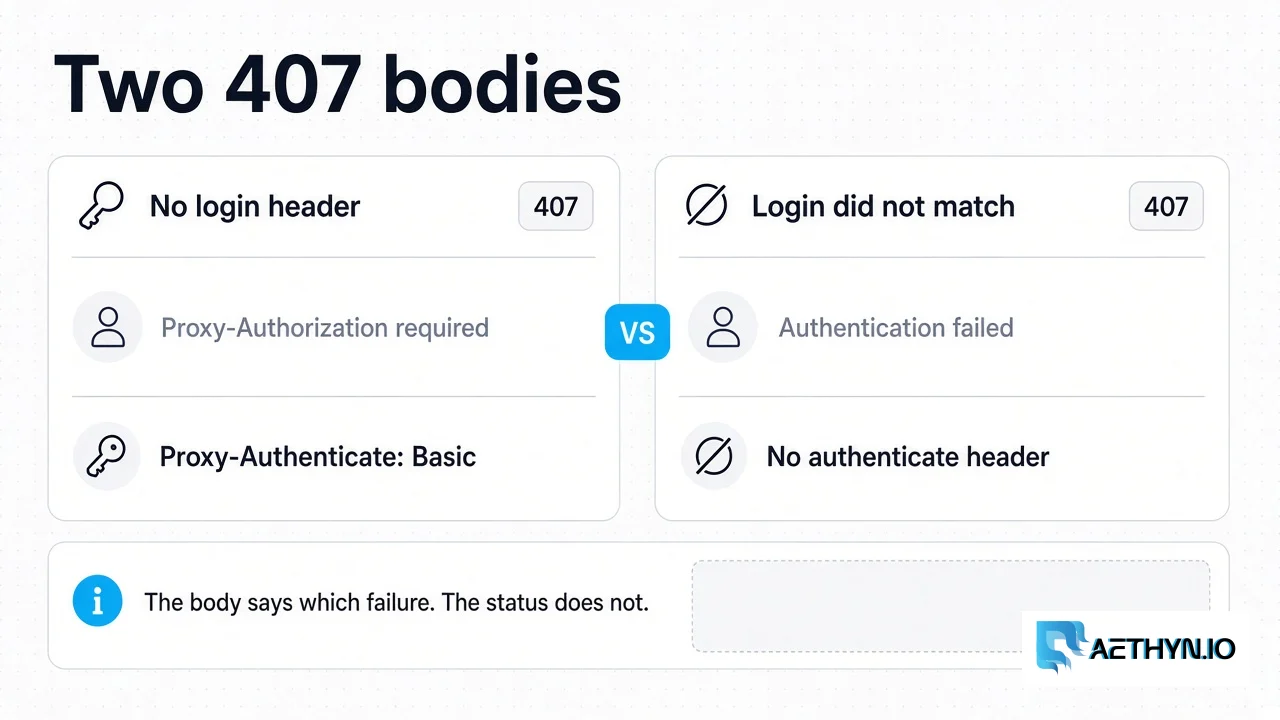
HTTP 407 Proxy Authentication Required: What the Gateway Returns
Aethyn returns 407 for a missing login or a failed login. A spent bandwidth quota is 403, and the gateway does not check an IP allowlist.
Residential exits for browser automation
Premium HTTP on 2099, Elite HTTP on 5499, with sticky sessions so one browser keeps one IP. Premium from €2.00/GB.