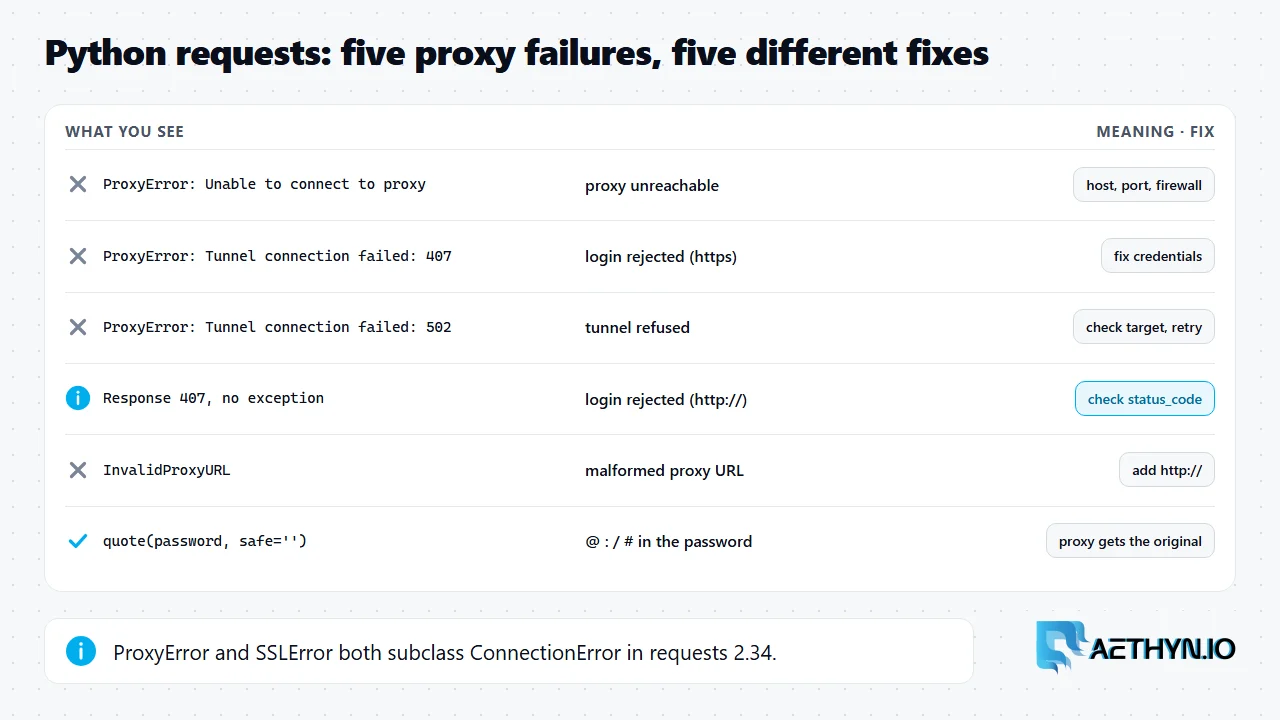
Short answer: When a request through a proxy fails, Python's requests library raises a handful of exceptions that look similar but point to different problems. ProxyError with "Unable to connect to proxy" means requests never reached the proxy: the host or port is wrong, the proxy is down, or a firewall blocks it. ProxyError with "Tunnel connection failed" followed by a status code means requests reached the proxy, asked it to open a tunnel to an HTTPS site, and the proxy refused; a 407 there means the username or password was rejected. InvalidProxyURL means the proxy string itself is malformed, often a missing http://. The trap is the plain-HTTP case: with a wrong password and an http:// target URL, requests raises nothing and returns a normal response with status code 407. We reproduced each case with requests 2.34 against a local test proxy. The classifier below tells them apart.
What each failure looks like
| What you see | Meaning | Fix |
|---|---|---|
ProxyError: ... Unable to connect to proxy ... NewConnectionError | The proxy host or port is unreachable | Check host, port, firewall |
ProxyError: ... Tunnel connection failed: 407 Proxy Authentication Required | Wrong login, HTTPS URL | Fix the username or password |
ProxyError: ... Tunnel connection failed: 502 Bad Gateway (or 403, 503) | Proxy reached, tunnel refused | Check the target and retry later |
Response with status_code == 407, no exception | Wrong login, plain-HTTP URL | Check the status code |
InvalidProxyURL: Please check proxy URL | Malformed proxy string | Add the http:// scheme |
ProxyError with a read timeout, https:// proxy URL | TLS to a proxy that speaks plain HTTP | Use http:// for the proxy URL itself |
Two mistakes that cause most of these
The first is the proxy URL scheme. The https key in the proxies dictionary says which target URLs use the proxy; it does not mean the proxy URL should start with https://. Most proxies, Aethyn's included, accept plain HTTP on their HTTP port and tunnel HTTPS traffic through CONNECT. Writing https:// in the proxy URL makes requests try to open TLS to the proxy itself. Against our test proxy that hung until the read timeout and surfaced as a ProxyError. The second is special characters in the password. A password containing @, :, / or # breaks the URL unless it is percent-encoded. urllib.parse.quote(password, safe='') fixes it, and we confirmed the proxy receives the original password. Avoid storing credentials in environment variables or committed files. The requests documentation flags both as a security risk.
A classifier that tells them apart
Code Snippetfrom urllib.parse import quote

import requests

USER = "aethyn-XXXXX-country-us"
PASSWORD = "PASSWORD"  # percent-encode it if it contains @ : / or #
proxy = f"http://{USER}:{quote(PASSWORD, safe='')}@proxy.aethyn.io:2099"
proxies = {"http": proxy, "https": proxy}


def fetch(url):
    try:
        r = requests.get(url, proxies=proxies, timeout=(10, 30))
    except requests.exceptions.InvalidProxyURL:
        return "bad proxy URL: check the scheme (http://) and the host"
    except requests.exceptions.SSLError as e:
        return f"TLS failed: {e}"
    except requests.exceptions.ProxyError as e:
        if "Tunnel connection failed: 407" in str(e):
            return "proxy rejected the login (407 on CONNECT)"
        if "Tunnel connection failed" in str(e):
            return "proxy refused the tunnel (CONNECT got a non-200 reply)"
        return "could not reach the proxy: host, port or firewall"
    except requests.exceptions.ConnectTimeout:
        return "connect timed out: safe to retry"
    if r.status_code == 407:
        return "proxy rejected the login (407 on a plain-HTTP URL)"
    return r
The code on this page was run on November 22, 2026 against a local stand-in proxy that checks the login (Chromium 149, requests 2.34, Selenium 4.53, Puppeteer 25.18), not against live targets or the Aethyn gateway. Replace aethyn-XXXXX and PASSWORD with your own credentials.
The order of the except clauses matters. In requests 2.34, ProxyError and SSLError both subclass ConnectionError, so catch them before any broader handler. ConnectTimeout is the one that requests documents as safe to retry.
SOCKS5 with requests
Install the extra with pip install "requests[socks]", then use socks5h:// rather than socks5:// so DNS is resolved by the proxy, not on your machine. The same rule applies in aiohttp with SOCKS5. Aethyn's SOCKS5 ports are 1099 on Premium and 3499 on Elite, with the same credentials as HTTP.
Python requests proxy error questions
What does requests.exceptions.ProxyError mean?
Why does my wrong proxy password not raise an exception?
How do I use a proxy password with special characters in requests?
Is ProxyError a subclass of ConnectionError?
Guides, integrations & docs
Continue reading
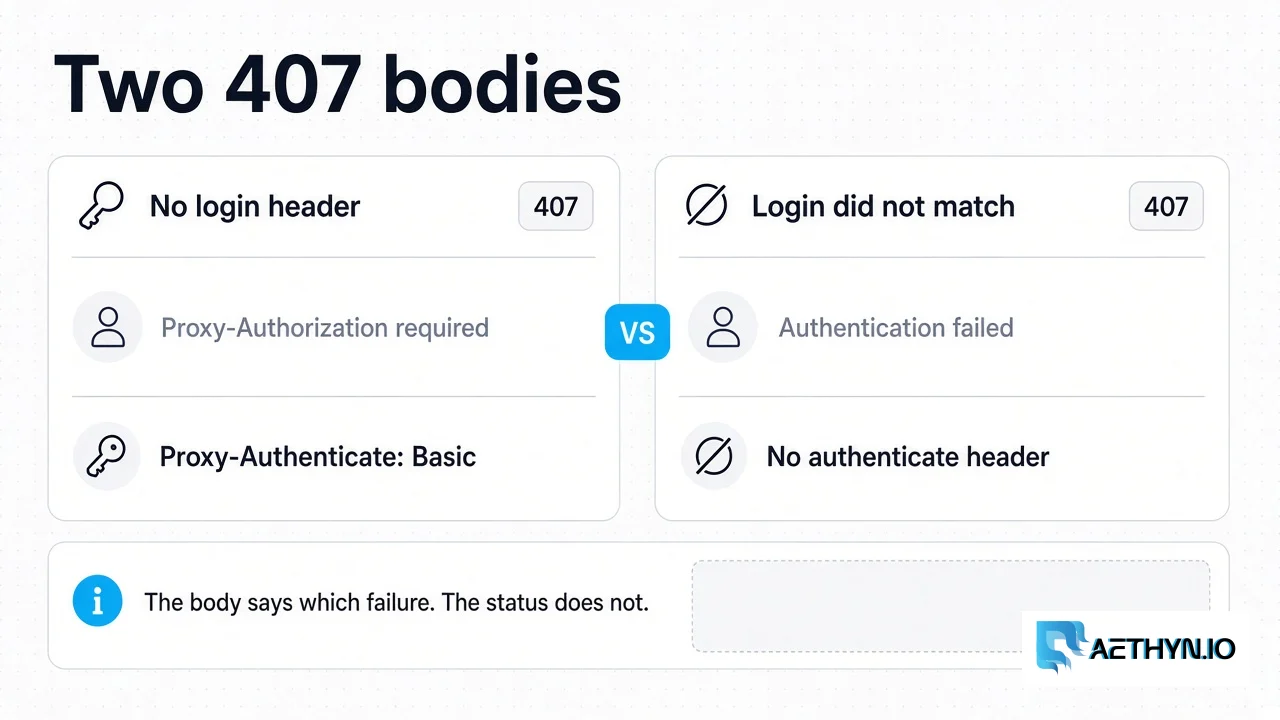
HTTP 407 Proxy Authentication Required: What the Gateway Returns
Aethyn returns 407 for a missing login or a failed login. A spent bandwidth quota is 403, and the gateway does not check an IP allowlist.
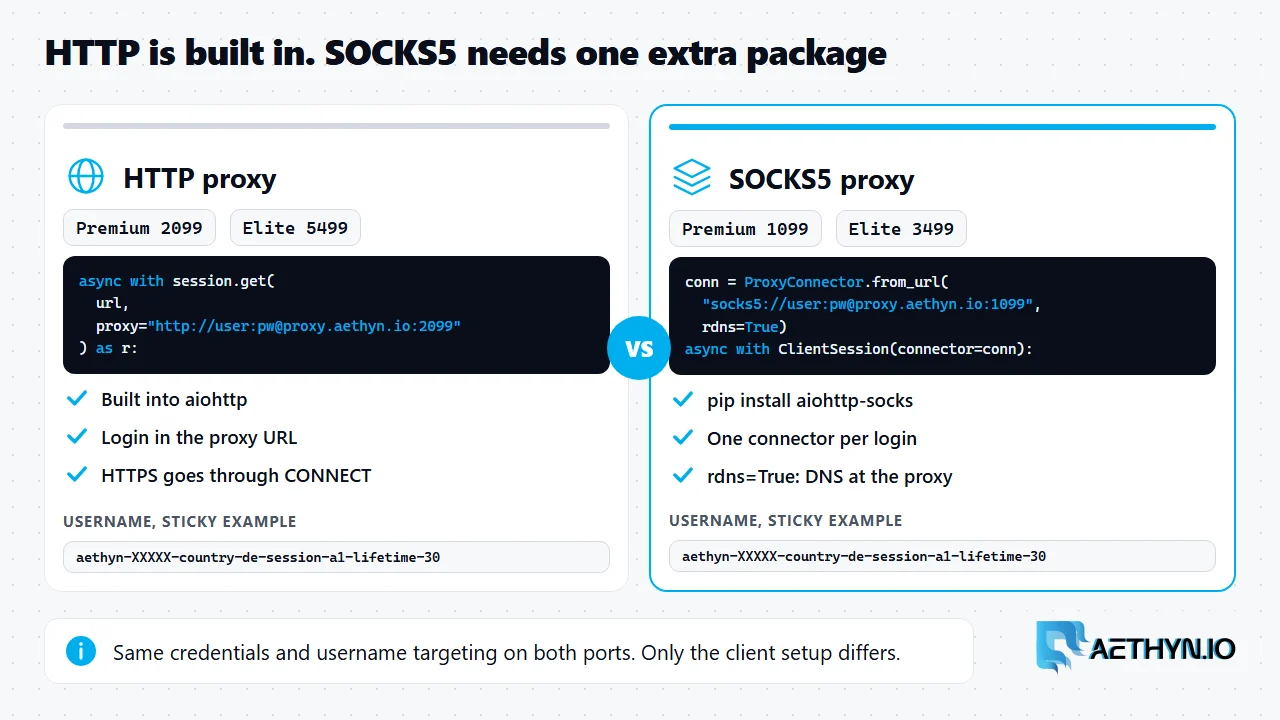
aiohttp with HTTP and SOCKS5 Proxies: Working Python Code (2026)
aiohttp handles HTTP proxies natively and needs aiohttp-socks for SOCKS5. Working code for both, remote DNS with rdns=True, and one sticky session per login.
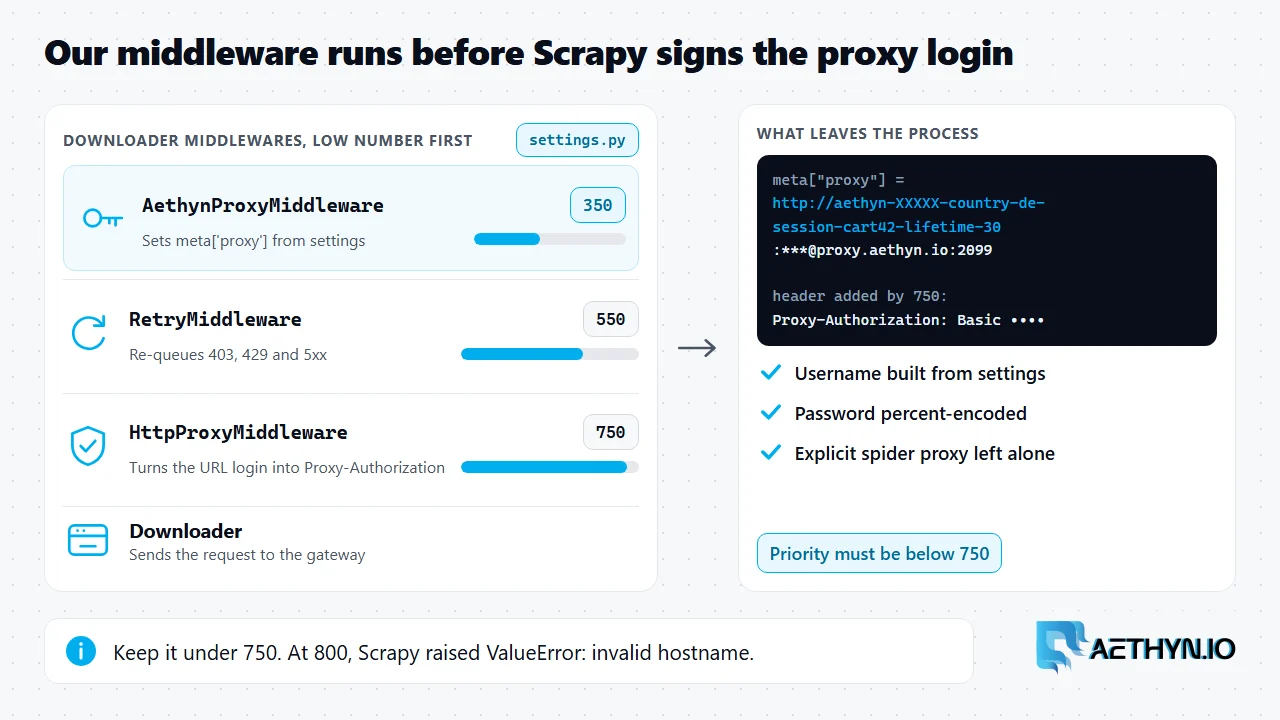
Scrapy Proxy Middleware for Rotating and Sticky Residential IPs (2026)
A Scrapy proxy middleware sets the proxy on every request. This one builds the Aethyn username, holds a sticky session per walk, and gives retried requests a fresh exit.
A proxy URL that just works in requests
http://USER:PASS@proxy.aethyn.io:2099 for Premium, port 5499 for Elite. SOCKS5 on 1099 and 3499 with requests[socks].